How to Change Your Twitter Background Image
Create a customized Twitter theme for your account by uploading a background image.
by
Doug
Updated April 15, 2010
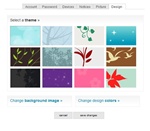
On Twitter's menu tab at the top, click on the "Settings" link, then click on the "Design" tab.
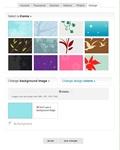
To choose a custom image on your computer, click on "Change background image »".

After changing the background image, you may get the following Twitter fail whale message: Twitter is over capacity.

I also received this error message, after trying to upload a new background image.
Step by step on how-to change your Twitter background image to make a customized Twitter theme.
- Login to your Twitter account
- On the menu tab at the top, click on the "Settings" link.
- Now click on the "Design" tab.
- You'll be able to change the theme using Twitter's preset themes or using your own custom background image. In this example we will choose a custom image, so click on "Change background image »".
- Now click on the text that says "Browse..." to choose a file to upload from your computer. Find an image that you want to use that is smaller than 800k. and is a GIF, JPG, or PNG, then click Open.
- Click on the box with your image (It's the one next to the box that says "Don't use a background image"). If you would like to tile the background, select "tile background".
- To finish, click "Save Changes" button, and you'll get a quick message saying "Your profile customization has been saved."
To see your new background image Twitter theme, you may have to refresh your browser.
Note: I received Twitter error messages after uploading my background image. It appears that there are still some bugs with Twitter's upload code.