How to Monitor Twitter Keywords in Real-Time
by
Doug
Updated April 6, 2009
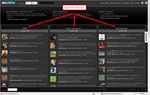
This shows the three column layout of Monitter.com. Simply click on any of the words to change keywords to something else, and within seconds you begin seeing relevant tweets streaming live
Wouldn't it be cool if you could monitor Twitter conversations in real-time based on certain keywords. Well guess what... you can, and the best part is it's super easy to do. You don't even have to download and install any software.
A new website called Monitter.com allows you to "monitter" the conversations in the twitter world for a particular set of keywords and watch what people are saying in real-time. It really is quite cool... The default settings allow you to monitor 3 keywords at once, but you can add (or remove) columns to monitter more keywords. You can also change the dark themed background to a light theme if you so choose. Another neat feature, is the ability to Pause the live twitter stream in case updates are moving to quickly and you want to read what is being said.
So to start monitoring Twitter conversations for certain keywords in real-time, head on over to Monitter.com.
Note: I did experience an issue while trying to view the site in IE 8, so if you are using Internet Explorer 8, you will have to click on the "Compatiblity View" button, to get Monittor.com to work correctly. The site does appear to work correctly in Firefox.