How to Disable Microsoft Security Essentials
Steps to turn off Microsoft Security Essentials.
by
Doug
Updated June 24, 2010
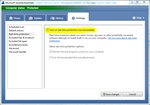
Uncheck "Turn on real-time protection" to disable Microsoft Security Essentials.
At some point, you may need to disable Microsoft Security Essentials (MSE) in order to install other software. To disable MSE follow these steps:
- Open Microsoft Security Essentials
- Click on the Settings tab.
- In the left-hand menu, select Real-time protection, then uncheck Turn on real-time protection (recommend).
- Then click Save changes button.