How to Fix the 'tinyMCE' is undefined error when running in IIS7
by
Doug
Updated December 18, 2009
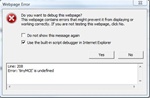
The following Error: 'tinyMCE' is undefined can occur when the TinyMCE handler is missing from the system.webServer handlers section in the web.config file of an ASP.NET website running in IIS7.
If you've recently moved a Visual Studio.net web site project (wsp) or web application project(wap) to deploy on Internet Information Services 7 (IIS7) you may have discovered that your Tiny_MCE text editor no longer is showing up and getting the pop-up error box saying "'tinyMCE is undefined". The Tiny_MCE text editor may have been working fine with Visual Studio.net's development server, but once you moved the site over to run in IIS7 the error starts occurring. At least that's what happened in my case.
The way I fixed this error was to include the following in my web.config file in the 'system.webServer' section:
 <system.webServer>
         <modules>
  </modules>
  <handlers>
          <add name="TinyMCE" preCondition="integratedMode" verb="GET,HEAD,POST" path="TinyMCE.ashx" type="Moxiecode.TinyMCE.Web.HttpHandler, Moxiecode.TinyMCE"/>
        </handlers>
 </system.webServer>
Note: If you're IIS7 site is running with the Application Pool set to "Classic" then you'll want to change the preCondition above to preCondition="classicMode". And if you're running your IIS7 website with the Application Pool set to "Integrated" mode then you will want to use preCondition="integratedMode" in the system.webServer handlers section for TinyMCE.