How to Break a Web Page Out from an iFrame Automatically
Javascript code to breakout a web page from underneath an iFrame.
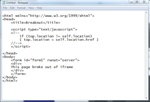
Javascript used to breakout of an iFrame html tag, as seen in an html page.
A lot of social bookmarking sites are now iFraming in other websites, in order to keep traffic on their site so they get more pageviews. In order to get around the HTML iFraming of your site, below is a little javascript code that will automatically get a web page out from underneath an iFrame.
Place the iFrame breaking code shown below, in between the <head> and </head> tags in your html page:
    <script type="text/javascript">
    <!--
        if (top.location != self.location)
        { top.location = self.location.href }
    //-->
    </script>