How to Run Visual Studio.NET Automatically as an Administrator
Setup Microsoft Visual Studio to automatically run in Administrator mode.
by
Doug
Updated July 16, 2010
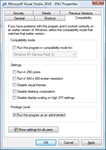
You can set the Privilege Level for Visual Studio.NET to automatically start up and run as an administrator.
When developing websites or applications in Visual Studio.NET, you sometimes need to have Visual Studio run as an administrator. For instance, if you are developing a Web Application Project that uses IIS7 as the local development server for testing, chances are you need to run Visual Studio 2010 as an administrator to access the Solution/ Project files in Visual Studio. While you can manually select Visual Studio to "Run as administrator" everytime you start the program, this can become a bit of a hassle after a while.
Instead, it's much easier just to change the Privilege Level for Microsoft Visual Studio to automatically start up and run as an administrator. Here's how to do this when using a Windows Vista computer:
- Click the 'Start' button.
- Click 'All Programs'
- In the menu, locate and click on the folder that says 'Microsoft Visual Studio 2010' (your version might be 2005, or 2008).
- Now right-click on the 'Microsoft Visual Studio 2010' program file, which will bring up the 'Properties' pop-up box.
- Select the 'Compatibility' tab, and then in the Privilege Level section, check the box next to "Run this program as an administrator"
- Click the 'Apply' button, then click the 'OK' button.
- Now each time you open Microsoft Visual Studio 2010, it will be running in (Administrator) mode.
UPDATE 7/15/2010: I actually switched to a newer and better method for running Visual Studio 2010 (or 2008) as an Administrator, which allows me to open files individually without getting VS2010 errors in Windows 7 when Visual Studio is running as an Admin. To see this new and improved method check out: How To Fix "There was a problem sending the command to the program." in Visual Studio