How to Fix “Validation (): Element ‘xxxxx’ is not supported” Visual Studio 2010 (VWD 2010 Express)
by
Doug
Updated July 9, 2010
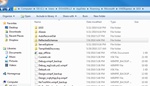
Delete the 'ReflectedSchemes' folder within Users -> {username} -> AppData -> Roaming -> Microsoft -> VWDExpress -> 10.0 folder, to fix "Validation (): Element 'xxxxx' is not supported" error for ASP.NET server controls within Visual Web Developer 2010 Express.
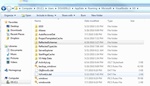
Delete the 'ReflectedSchemes' folder within Users -> {username} -> AppData -> Roaming -> Microsoft -> VisualStudio -> 9.0 folder, to fix "Validation (): Element 'xxxxx' is not supported" error for ASP.NET server controls within Visual Studio 2008.
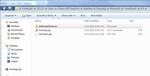
You may need to also delete the 'ReflectedSchemes' folder within Users -> Classic .NET AppPool -> AppData -> Roaming -> Microsoft -> VisualStudio -> 9.0 folder, to fix "Validation (): Element 'xxxxx' is not supported" error for ASP.NET server controls within Visual Studio 2008.
So yesterday, I started getting green squiggly line validation warnings at design time on ASP.NET server controls within the HTML Design view for my Visual Web Developer 2010 Express project in Windows 7. Essentially, intellisense on all the ASP.NET server controls would not work, but the project would compile successfully. The validation warnings on all asp.net server controls had the following message when hovering over the green squiggly line:
Validation (): Element ‘xxxxx’ is not supported.
So in this case 'xxxxx' would stand for a ASP.NET server controls (ex: asp:label, asp:textbox,asp:dropdownlist).
In order to fix this Validation/ intellisense issue in Visual Web Developer 2010 Express on Windows 7 follow these steps:
- Close down Visual Web Developer 2010 Express.
- Go to Control Panel -> Appearances and Personalization -> Folder Options -> then select the View tab. Now make sure "Show hidden files, folders, and drives" is selected and click OK.
- Now browse to the following location: Computer -> OS (C:) -> Users -> {username} -> AppData -> Roaming -> Microsoft -> VWDExpress -> 10.0 folder.
- Now delete the "ReflectedSchemes" folder. This should fix "Validation (): Element '' is not supported" error for ASP.NET server controls within Visual Web Developer 2010 Express.
- Open Visual Web Developer 2010 Express and open your project, which now should have intellisense working correctly for ASP.NET server controls.
To fix this Validation/ intellisense issue in Visual Studio 2008 or VS2010 on Windows 7 follow these steps:
- Close down Visual Studio 2008 (or Visual Studio 2010).
- Go to Control Panel -> Appearances and Personalization -> Folder Options -> then select the View tab. Now make sure "Show hidden files, folders, and drives" is selected and click OK.
- Now browse to the following folder: Computer -> OS (C:) -> Users -> {username} -> AppData -> Roaming -> Microsoft -> VisualStudio -> 9.0 folder. Note: in Visual Studio 2010 would be 10.0 folder.
- Now delete the "ReflectedSchemes" folder. This should fix "Validation (): Element '' is not supported" error for ASP.NET server controls within Visual Studio 2008.
- After reopening your Visual Studio 2008 project, you should now have intellisense working correctly for ASP.NET server controls.
NOTE: You may also need to delete the 'ReflectedSchemes' folder within Users -> Classic .NET AppPool -> AppData -> Roaming -> Microsoft -> VisualStudio -> 9.0 folder, to fix "Validation (): Element 'xxxxx' is not supported" error for ASP.NET server controls within Visual Studio 2008.
If you're using Visual Studio 2008 on Windows Vista or XP, the location of the 'ReflectedSchemes' folder should be located at: C:\Documents and Settings\{username}\Application Data\Microsoft\VisualStudio\9.0\ReflectedSchemas