How to Tell if Your Computer is Running a 32-bit or a 64-bit version of Windows Vista?
by
Doug
Updated January 21, 2010
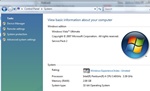
In the System section, next to System type, you will be able to find out if your computer is running a 32-bit or 64-bit version of Windows.
Here's how you can determine if your computer is running a 32-bit or 64-bit version of Windows:
- Click on the Start button
 -> then click Control Panel, -> then click System and Maintenance, -> and then click System.
- In the System section, you'll be able to find out the System type: (32-bit Operating System or 64-bit Operating System).
- That's it!