How to Set the Alarm on Your iPhone
by
Doug
Updated April 23, 2009
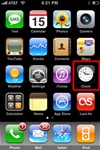
To get started setting an alarm on your iphone, tap the "Clock" icon.
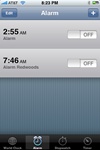
Select the "Alarm" icon on the bottom menu of your iphone, if the Alarm screen does not show up at first.
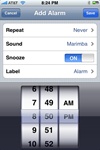
On the Add Alarm screen, set your alarm and then hit the "Save" button.
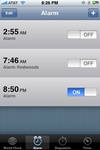
iPhone alarm at 8:50 PM is not set to ON.
Here's how to go about setting the alarm on your iPhone:
- Tap the "Clock" icon.
- Select the "Alarm" icon on the bottom menu.
- Press the plus sign "+" on the upper right-hand side to add a new alarm.
- Choose your alarm settings (Repeat, Sound, Snooze, Label) and set the time you want the alarm to go off. Then tap the "Save" button in the upper right-hand side.
You should now see your new alarm set to ON. When the iphone alarm goes off, you'll get an alarm notification box that appears on the iPhone screen. Tap "OK" to turn the alarm off, or hit "Snooze" to have the alarm go off again in 10 minutes.